🔒 Local mode by default · client files stay on your machine

Sort and merge a client's tax PDFs into one accountant-ready folder — 100% on your machine.

Built by a software engineer who got tired of chasing tax docs. PDF Insight classifies, renames and merges T4, RL-1, RL-31, receipts and invoices into one clean folder — fully offline, so client files never leave your computer.

It sorts, classifies and merges a client's tax documents It is not tax-filing software: it does not file your taxes

or get Founder Lifetime — $399 once →

14-day free trial, no card Default local mode: no upload, no server French & English · macOS & Windows
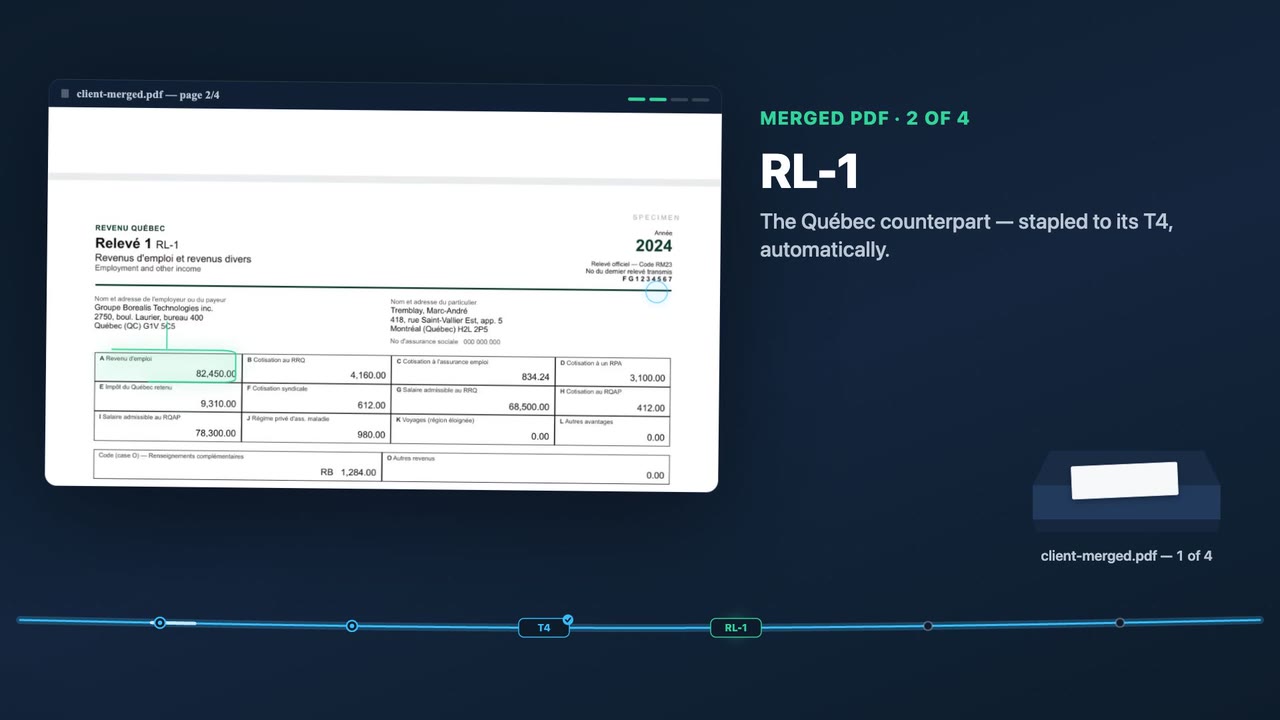
A merged, category-ordered tax package built by PDF Insight, showing an authentic T5 statement of investment income.
Default local mode: client files stay on your machine
macOS build signed & notarized by Apple
Works fully offline, no account required
See it in action

From a messy client folder to one accountant-ready PDF

This is what PDF Insight does to a real client's pile: it reads, classifies and merges every slip into one correctly-ordered file. The whole thing runs on your own machine.

The pile a client sends· 11 loose files

  • Scan_2024-03-12_0001.pdf
  • IMG_8842.pdf
  • releve1 (2).pdf
  • T4 final FINAL.pdf
  • facture-pharmacie.pdf
  • wealthsimple-releve.pdf
  • numerisation-003.pdf
  • + 4 more unnamed scans

One merged, sorted package

client-2024-tax-package.pdf Merged
  1. 01T4 · RL-1 employment slipsIncome
  2. 02T4A pension / self-employmentIncome
  3. 03T5 investment incomeIncome
  4. 04RRSP / REER contribution receiptDeductions
  5. 05RL-31 housing slipCredits
  6. 06Medical & pharmacy receiptsCredits
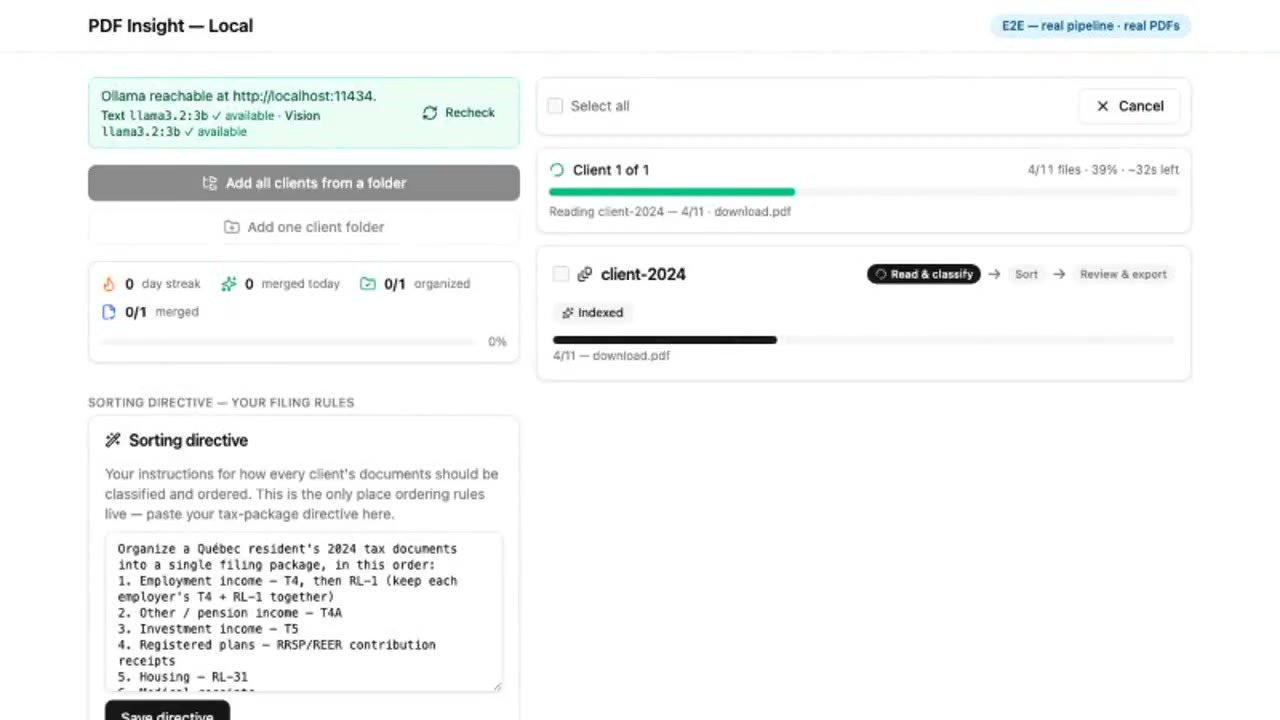
The PDF Insight desktop app mid-run, showing the sorting directive and a client folder being read and classified locally.

Real app The actual PDF Insight desktop app sorting a real client folder. The full run happens on your own machine, so client files never leave your computer.

Ready to buy? Unlock everything: Founder Lifetime · $399 or Solo · $49

Who it's for

Two kinds of people use PDF Insight. Pick the door that sounds like you.

For accountants & bookkeepers

Tax preparers, bookkeepers and firms handling client files

  • Sorts and merges a client's T4, T4A, T5, RL-1, RL-3 and RL-31 slips into one correctly-ordered file
  • Speaks Québec slip vocabulary in French and English, the way your clients' documents arrive
  • Client files stay on your machine, so there's no third-party cloud copy to breach
See the accountant workflow →

For everyone else

Self-employed, and anyone with a pile of PDFs to organize

  • Self-employed: turn a year of receipts and statements into one clean PDF to send your accountant
  • Legal bundles, patient records, closing packages, research files
  • No setup and no jargon: drop in a folder, say how you want it ordered, get one file back
See everyday uses →

From a messy folder to a signed-off PDF

Point it at a folder. Write your sorting rules once. PDF Insight reads and classifies every document, even scanned pages, orders them your way, lets you review, and exports one clean merged file. Nothing leaves your computer. Curious how it works? It's all under the hood, just below.

1
Drop in a client folder
2
It sorts & merges
3
One clean, ordered PDF

🧭 On the roadmap: a guided assistant that asks the right questions as you go, so nothing's missed in a client's return. Not in the app yet — the tool sorts and merges today.

How it works, under the hood

The plain version is above. Here's the technical detail, for anyone who wants it.

The local AI model runs via Ollama (free)

PDF Insight runs an open local language model on your own machine through Ollama, which is free to install. The model reads and classifies each document locally; no account, API key or internet connection is needed for the local tier.

On-device OCR for scans, via Tesseract (English & French)

Scanned and image-based pages are read with on-device OCR using Tesseract, in both English and French, so scanned slips are sorted and ordered just like native digital PDFs. The OCR runs entirely on your computer.

Nothing is uploaded, and it works offline

In the local tier, nothing is uploaded. No server, no cloud copy of your files. It works with no internet connection, so it keeps running on an air-gapped machine during tax season.

Optional, clearly-labelled paid cloud speed lane (Cerebras)

If you want near-instant processing, there is an optional, clearly-labelled paid cloud speed lane powered by Cerebras. It is off by default and billed separately; only when you turn it on do documents leave your machine.

Why local-first matters

In local mode, your clients' files stay on your computer. Not stored elsewhere, not stored at all.

TaxDome, SmartVault, Canopy and Dext lead with compliance badges precisely because client files sit in their cloud. Pasting documents into ChatGPT ships client SINs to a third party. In PDF Insight's default local mode, documents are read, sorted and merged on your machine, so there's no upload, no server, and no third-party copy to breach. It removes the risk instead of insuring it.

Cloud document tools

Client files uploaded to someone else's servers. You're trusting their breach response.

PDF Insight

The AI runs on your machine. Files are read locally and never transmitted. Nothing to breach.

Simple, honest pricing. Pick what fits you.

Prices in CAD. 14-day free trial, no card required. Plans named for who you are, not for upsells.

Pay once for this version (Solo), subscribe to always stay current (Individual), or pay once for lifetime updates (Founder).

🚀 Launch offer, first 100 customers: get the Founder Lifetime for $399 once, instead of subscribing. Same app, paid one time.
Prepaid pack

Starter cloud pack

A low-commitment way to try the optional cloud speed lane

$5 CAD, once

What you getAbout 100 pages of cloud processing — roughly 10 scanned documents or a season of client merges and sorts

  • Quota counted in plain pages and documents, never tokens or opaque credits
  • Optional speed lane only — local mode stays free and private, nothing leaves your machine there
Notify me

Self-serve cloud checkout is on the way — we'll email you the moment the starter pack is ready to buy.

One-time

Solo

For one person organizing their own PDFs

$49 CAD, once

UpdatesCurrent major version only — no future major upgrades

  • Every local feature, on your own computer
  • No subscription, no account
Buy Solo · $49
Subscription

Individual

For you, a solo preparer or personal use

$290 /year

UpdatesAlways on the latest version while subscribed

  • One preparer, every feature
  • 2 months free vs. paying monthly
  • About ⅓ of TaxDome, and data stays local
Subscribe yearly or $29/month →
BEST VALUE · FIRST 100
One-time

Founder Lifetime

Pay once, keep it forever — for early adopters

$399 CAD, once

UpdatesAll future updates, forever — no renewals

What's included
  • Every local feature, on your own computer — for one person's use
  • All future updates, at no extra cost
  • Priority email support
  • Founder badge in the app
  • Covered by the same 30-day money-back guarantee

Why lifetime? One payment covers the app for good — no yearly renewal to budget for, and every future update is already included.

Buy lifetime · $399

Only the first 100 customers get this $399 lifetime price — no countdown, no fake timer. After that, it's subscription only.

Firm

For your team, multiple preparers

$25 /seat/mo
  • 3+ seats, billed annually
  • Team admin & shared sorting rules
  • Onboarding help included
Talk to us · Firm
💡 At ~2 hours saved per client and 200 clients a season, $290/yr pays for itself on your very first client.
30-day money-back guarantee. Try it on a real client folder. If PDF Insight doesn't save you time, email us within 30 days for a full refund — no forms, no questions.

Handling client tax documents? See how the local-first architecture keeps files on your machine — nothing uploaded by default. Privacy & security →

Start free — 14-day trial

No credit card. Default local mode runs on your computer with nothing to upload. macOS and Linux are ready; Windows is temporarily paused.

macOS: signed & notarized by Apple, so it just opens with no warnings. Windows: paused while we replace an installer with a broken signature; email us if you need early access. Needs Ollama (free) for the local AI; setup link is in the app.

Frequently asked questions

Tap a question to expand. Straight answers for accountants and bookkeepers evaluating a private, local document tool.

I'm self-employed and not techy — is this for me?

Yes. You don't set up anything. Drop your receipts and statements in a folder, type how you want them ordered, and get one clean PDF to send your accountant. Nothing is uploaded.

Is PDF Insight private — does it upload my clients' files anywhere?

No. In the default local tier, PDF Insight runs entirely on your own computer. Your clients' tax PDFs are read, classified and merged on-device and are never uploaded to any server. An optional, clearly-labelled paid cloud speed lane (powered by Cerebras) can be turned on for near-instant processing; only then do documents leave the machine. The local tier is the default — nothing leaves your machine when you use it.

Does PDF Insight work offline?

Yes. The local tier works fully offline. The AI model runs on-device through Ollama and the OCR runs on-device through Tesseract, so PDF Insight can organize and merge a client's documents with no internet connection. The licence check is offline-tolerant with a grace window, so it won't break on an air-gapped tax-season machine.

Which tax slips does PDF Insight support?

PDF Insight is built for Quebec and Canadian tax slips, including T4, T4A, T5, RL-1, RL-3, RL-31, RRSP/REER contribution receipts and FHSA documents. Because it uses a local LLM to read and classify documents, you can also write your own rules to handle any other document in a client's pile.

How do I merge a client's tax slips into one PDF?

Point PDF Insight at the client's folder, write your sorting rules once, and the local AI classifies and orders every slip the way you specified. You review the result and export a single merged, correctly-ordered PDF for that client. A real 11-document bundle is organized in about 100 seconds on a 16GB Mac.

Does PDF Insight do OCR on scanned documents?

Yes. PDF Insight reads scanned and image-based pages with on-device OCR using Tesseract, so scanned slips are classified and ordered just like native digital PDFs. The OCR runs locally and scanned pages are never sent to the cloud in the local tier.

Does PDF Insight run on both Mac and Windows?

Yes. PDF Insight is a desktop application that runs on both macOS and Windows. On a 16GB Mac it organizes a full client bundle in about 100 seconds entirely on-device.

How is PDF Insight different from TaxDome, SmartVault or Canopy?

TaxDome, SmartVault and Canopy are cloud document vaults that store your clients' files on their servers and charge per seat. PDF Insight is a local organizer that runs on your own machine and pre-sorts and merges the pile before it ever reaches a vault. Because nothing is uploaded in the local tier, there is no third-party copy of client data to breach. It also speaks Quebec slip vocabulary (T4, RL-1, RL-31) in French and English, which the US cloud tools do not.

How long does PDF Insight take to organize a client's documents?

A real 11-document client bundle is organized in about 100 seconds fully locally on a 16GB Mac. If you enable the optional paid cloud speed lane (Cerebras), the same work completes in roughly one second of compute.
Stay in the loop — get product updates

Occasional notes on new releases, features and guides. Just your email — no spam, unsubscribe anytime.

We only use your email to send these updates. Nothing about your documents ever leaves your computer.